Opus 5.5로 모션 디자인 스튜디오 만드는 법 — 12단계 풀코스 번역(복붙 자료)
Opus 5.5로 모션 디자인을 시도한 사람 대부분은 똑같은 영상을 얻습니다.
그라디언트 위 가운데 정렬된 텍스트, 전부 페이드인, 마지막에 로고. 레퍼런스도 주지 않고, 렌더 엔진도 주지 않고, 자기가 만든 프레임을 보라고 시키지도 않기 때문입니다.
이 글은 그 엉망인 결과물을 반복 가능한 스튜디오 파이프라인으로 바꾸는 12단계 코스입니다.
영상에서 프롬프트는 10%입니다. 나머지 90%는 하네스(작업 환경)입니다.
최신 AI 알파를 받으려면 제 Substack을 구독하세요: movez.substack.com
0xMovez's Substack | Substack
My personal Substack. Click to read 0xMovez's Substack, by 0xMovez AI, a Substack publication with thousands of subscribers.
movez.substack.com
Claude @claudeai · 9월 23일
Claude Opus 5.5를 소개합니다. 저희 새로운 Claude 5.5 제품군의 첫 번째 모델입니다. 대부분의 작업에서 Claude Fable 5.1 수준으로 성능을 발휘하며, Opus 5보다 실행 비용이 40% 적습니다.
X에서 Claude(@claudeai) 님
x.com
X에서 Claude(@claudeai) 님
Claude is an AI assistant built by @anthropicai to be safe, accurate, and secure. Talk to Claude on https://t.co/ZhTwG8d1e5 or download the app.
x.com
2026년 9월 22일, Anthropic이 Claude Opus 5.5를 출시했습니다.
몇 시간 만에 타임라인은 쇼릴, 출시 영상, 뮤직비디오, 5분짜리 역사 영화로 가득 찼고, 전부 코드로 렌더링된 것이었습니다.
캡션에는 "프롬프트 하나"라고 적혀 있었고, 답글에는 "모션 디자이너들 이제 끝났다"는 말이 달렸습니다.
둘 다 절반만 맞습니다. 어떤 클립은 정말 30단어짜리 프롬프트에서 나왔습니다.
다른 클립은 9,500자짜리 감독 브리프, 스킬 폴더, API 키 두 개, 그리고 12시간 자율 실행에서 나왔습니다.
Claude Code 팀의 Thariq는 이 간극을 한 줄로 정리했습니다. 게시물에는 원샷이라고 쓰여 있지만, 프롬프트는 스킬·예시·키가 들어간 1만 자라는 겁니다.
Thariq @trq212 · 9월 24일
게시물: "Claude one-shot 이거" 프롬프트: 10k 문자로 좋은 관점들 플러스 스킬, 예시 그리고 API 키들
X에서 Thariq(@trq212) 님
x.com
이 코스는 양 끝과 그 사이의 모든 것을 보여줍니다.
트렌드를 만든 게시물 9개를 모두 읽고, 각 게시물이 쓴 프롬프트 패턴을 따라 한 뒤, 엔진을 직접 만들어 보게 됩니다.
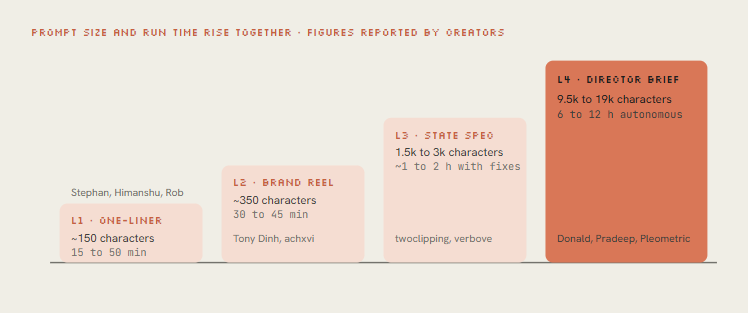
seek(t) 렌더러, 닫힌 형태의 스프링, 비트 그리드, 합성 사운드, 그리고 Opus가 자기 프레임을 스스로 고치게 만드는 비평 루프까지.
- 파트 1 · 실제로 무슨 일이 일어나는가
01. 픽셀 - 모델은 영상이 아니라 프로그램을 쓴다
Opus 5.5는 텍스트와 이미지를 받아 텍스트를 내놓습니다. MP4를 출력할 수는 없습니다. 이 트렌드의 모든 영상은 Opus가 쓴 프로그램이고, 그 프로그램을 프레임으로 바꾼 건 다른 무언가입니다.
핵심 기법은 결정성(determinism)입니다. Opus는 draw(t) 또는 seek(t)라는 함수 하나를 작성하고, 이 함수는 어떤 시점이든 그 순간의 프레임을 정확히 그려냅니다.
헤드리스 브라우저가 60fps로 15초 분량, 즉 900번 이 함수를 호출해 매 프레임을 캡처하고, ffmpeg가 이를 이어 붙입니다.
타이머에 의존하는 것이 없으니 렌더링 결과는 매번 똑같고, 수정은 한 줄 편집과 재렌더링이면 끝납니다.
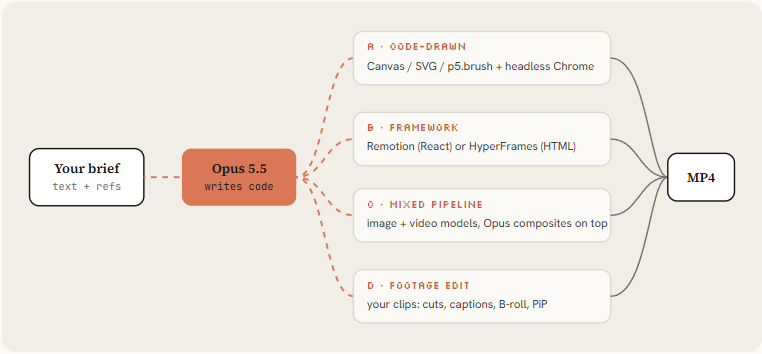
Tommy Rossi는 원샷 결과물을 파헤쳐 보고 Opus가 의존성 없는 A 경로를 선호한다는 걸 알아냈습니다. index.html 하나, eval로 호출되는 seek 함수, 프레임 단위로 캡처하는 Playwright, 인코딩하는 ffmpeg.

Remotion이나 HyperFrames를 쓸 수 있는 환경에서도 이를 건너뛰었습니다. 프레임워크를 쓰고 싶다면 명시적으로 말해야 합니다.
Tommy D. Rossi @__morse · 9월 25일
같은 프롬프트를 사용해서 시도해봤고, 비디오를 더 화려하게 만들도록 요청했어. opus 5.5는 정말 놀라워. 한 번의 시도로, 모든 코드를 단일 index.html 파일에 넣고 playwright를 사용해 헤드리스 창에서 프레임별로 렌더링한 다음, ffmpeg로 mp4를 생성했어. seek 함수와 eval을 사용해 각 더 보기
X에서 Tommy D. Rossi(@__morse) 님
x.com
02. 설정 - 10분 만에 스튜디오 설치하기
채팅 앱도 애니메이션 코드를 쓸 수는 있지만, 그걸 렌더링하고, 소리를 듣고, 자기 프레임을 들여다볼 수 있는 건 Claude Code(또는 셸이 있는 에이전트)뿐입니다.
사람들이 불평하는 "그저 그런" 첫 시도와 바이럴 영상의 차이는 전부 이 피드백 루프에서 나옵니다.
# 1. Runtime: Node 22+, ffmpeg, Python for audio analysis
brew install node ffmpeg python          # macOS; apt install on Linux
pip install numpy librosa soundfile

# 2. A clean project and a headless browser
mkdir motion-studio && cd motion-studio && npm init -y
npm i -D playwright && npx playwright install chromium

# 3. Framework skills (optional, route B)
npx skills add remotion-dev/skills       # /remotion-create, /remotion-render ...
npx skills add heygen-com/hyperframes    # /hyperframes router + GSAP skills

# 4. Hand-drawn look (optional): Node canvas rigs, pens, synthesized sound
claude plugin marketplace add buildwithhanif/claude-animation-skill
claude plugin install claude-animation@claude-animation-skill

# 5. Start Claude Code on Opus 5.5 at high effort
claude --model claude-opus-5-5
> /model   # pick Opus 5.5, then set effort to xhigh for one-shots, max for flagship pieces
그다음 프로젝트 루트에 규칙 파일을 둡니다. Claude Code는 실행할 때마다 CLAUDE.md를 읽기 때문에, 이 규칙은 반복해서 말하지 않아도 여기서 만드는 모든 영상에 적용됩니다.
# Motion studio rules

## Render contract
- Every film is a pure function of time: `window.seek(t)` paints frame t.
- No CSS transitions, no setTimeout, no requestAnimationFrame in render mode,
  no state carried between frames. Seeded noise only (mulberry32), never Math.random.
- Render with `node render.mjs`, encode H.264 yuv420p, CRF 16.

## Look
- Banned defaults: centered title on gradient, everything fading in,
  corner labels and frame borders, glow on UI chrome, generic particle bursts.
- One display face, one UI face. One accent color unless the brief says otherwise.
- Every 2 to 4 seconds something new must happen on screen.

## Sound
- Score and SFX are synthesized in code unless a track is supplied.
- Place hits on the measured beat grid (beats.json). Loudness -14 LUFS.

## Loop before you show me anything
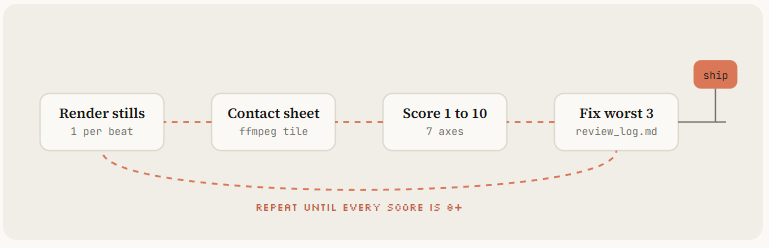
1. Render one frame per beat as a contact sheet and LOOK at it.
2. Score it 1-10 on: hook in first 2s, readability at phone size,
   motion quality, variety, brand accuracy, sound sync.
3. Fix the 3 worst problems. Repeat until every score is 8+.
4. Only then do the full render.
Opus 5.5의 기본 노력 수준은 medium이고, 답하기 전에 항상 생각합니다. 목록에 있는 바이럴 원샷은 모두 xhigh나 max로 돌렸습니다.
작은 수정과 재렌더링에는 medium, 새 영상에는 xhigh, 첫 3초가 출시를 책임져야 할 때는 max를 쓰세요.
- 파트 2 · 감독처럼 프롬프트 쓰기
03. 한 줄 프롬프트 - 쇼릴 프롬프트와 그게 통하는 이유
9개 게시물 중 4개가 같은 문장을 썼습니다. 한 줄이 어떻게 카메라 무빙, 키네틱 타이포, 오디오가 들어간 15초 영상을 만들었는지 이해해 둘 가치가 있습니다.
make a dynamic 15-second motion graphics video that shows what an
incredible motion designer you are, like it's your showreel for a résumé.
go all out.
- "이력서용 쇼릴(showreel for a résumé)"은 규칙이 정해진 장르를 지정합니다. 빠른 컷, 샷마다 새로운 기법, 가장 좋은 작업을 맨 앞에. Opus는 쇼릴이 어떻게 생겼는지 이미 알고 있습니다.
- "당신이 얼마나 대단한 모션 디자이너인지(what an incredible motion designer you are)"는 모델 자신을 주제로 만듭니다. 그래서 제품을 설명하는 대신 기법을 보여주고, 틀릴 내용 자체가 없습니다.
- "15초"는 한 번에 끝낼 만큼 짧고, 6~8개 샷을 넣을 만큼 깁니다.
- "전력을 다해(go all out)"는 xhigh나 max 위에 얹는 노력 배율처럼 작동합니다.
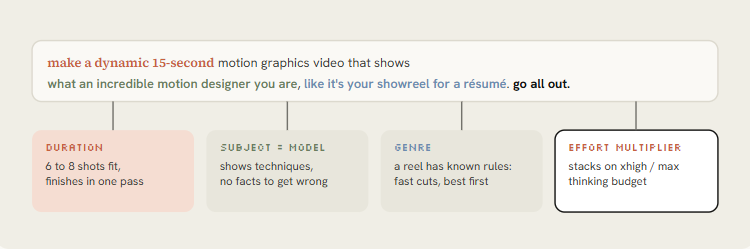
Max 노력으로 만든 원조 15초 이력서 쇼릴. 이 프롬프트의 출처입니다. 구조 분석 도식 바로 아래에 두세요.
Stephan Livera @stephanlivera · 9월 25일
맥스 노력으로 Opus 5.5 - "당신이 얼마나 놀라운 모션 디자이너인지 보여주는 역동적인 15초 모션 그래픽 비디오를 만들어라. 마치 이력서용 쇼릴처럼. 전력을 다해라."
X에서 Stephan Livera(@stephanlivera) 님
x.com
같은 프롬프트를 xhigh로, 오디오까지 원샷으로. xhigh로도 충분하고, 소리를 후반 작업으로 넣은 게 아니라는 걸 보여줍니다.
Rob Hallam @robj3d3 · 9월 27일
믿지 않았지만 이건 실제로 원샷이었어. xhigh effort에서의 Opus 5.5: "당신이 얼마나 놀라운 모션 디자이너인지 보여주는 역동적인 15초 모션 그래픽 비디오를 만들어 보세요. 마치 이력서용 쇼릴처럼요. 전력을 다해요."
X에서 Rob Hallam(@robj3d3) 님
x.com
약점도 있습니다. athemeroy 데이터셋은 이를 "브리프 전염(brief contagion)"이라고 부릅니다. 똑같은 프롬프트 수백 개가 서로 닮은 쇼릴을 만들어 냈죠. 환경을 테스트할 때 쓰고 넘어가세요. 실제로 공개돼 효과가 있었던 변형들:
# Longer, with a sound bar (pattern from @kloss_xyz's 90-second piano reel)
make a dynamic 16:9, 60-second motion graphics showreel that shows your real creative limits.
S-tier sound design, no generic synth pads. Compose an original piano score and sync every
cut to it. Export 1080p MP4.

# Anti-slop guardrail (pattern from @1littlecoder)
make a dynamic 10-second motion graphics video that introduces who you are as Opus 5.5.
Avoid frames and text in the corners, the usual giveaways of AI-made video.

# Story instead of techniques (pattern from @sonnylazuardi)
use your showreel energy, but tell a story: the history of [TOPIC] from [START] to today,
surprise me with the storyboard. 45 seconds, vertical 9:16.

# Agency persona
make a 30-second showreel as if you were a niche branding studio for startup founders.
Create every graphic from scratch. One accent color. Every shot is a different technique.
Himanshu @himanshutwtxs · 9월 25일
이건 미쳤어!! Opus 5.5를 MAX로 설정하고, 한 프롬프트로 모션 디자인 (소리 ON) 프롬프트- '당신이 얼마나 놀라운 모션 디자이너인지 보여주는 역동적인 15초 모션 그래픽 비디오를 만들어 보세요. 마치 이력서용 쇼릴처럼요. 전력을 다해 주세요'
X에서 Himanshu(@himanshutwtxs) 님
x.com
한 줄 프롬프트는 엔진을 테스트합니다. 아이디어를 테스트하지는 못합니다. 애초에 아이디어가 들어 있지 않으니까요.
04. 브랜드 - 쇼릴을 내 제품에 맞추기
무언가를 파는 사람에게 가장 유용한 건 Tony Dinh의 게시물입니다. 그는 1년 전 비슷한 출시 영상에 1,000달러 넘게 썼는데, 이번엔 30분도 안 걸렸습니다.
세 줄을 더한 게 전부였습니다. 제품 URL, "실제 제품 스크린샷·로고·에셋을 써라", 그리고 "음악은 필수". Opus가 사이트에 직접 들어가 에셋을 모았습니다.
Rob Hallam은 나머지 절반을 증명했습니다. 첫 쇼릴 뒤에 같은 채팅에서 제품 광고를 요청했더니, 렌더러·오디오 합성·내보내기 파이프라인이 이미 있어서 더 빨리 나왔습니다.
브랜드마다 세션을 하나씩 유지하세요.
Make a dynamic 20-second motion graphics video for [PRODUCT] ([URL]), with the energy
of a motion designer's showreel. Go all out.

Assets
- Visit the site. Use real screenshots (Playwright), the real logo, real colors and fonts.
  Save everything to ./assets and list what you found before you animate.
- Never redraw the product UI from imagination. Crop and animate the real thing.

Story (one beat each, 2 to 4 seconds)
1. Hook: the problem in 5 words of huge kinetic type.
2. The product appears, the UI assembles itself piece by piece.
3. Three features, each as a UI moment with a cursor doing a real action.
4. One number that proves it works: [METRIC].
5. Logo lockup + [CTA].

Sound
- Original music, 120 BPM, synthesized in code. UI clicks and whooshes on the beat.

Format: 1080x1920 (9:16) first, then 1:1 and 16:9 from the same timeline.
Before the full render, show me a contact sheet of one frame per beat.- 보여주는 것: 30분도 안 걸린 TypingMind 쇼릴이 1,000달러 넘는 에이전시 영상을 대체했습니다. 전체 프롬프트는 두 번째 답글에 있습니다.
Tony Dinh @tdinh_me · 9월 26일
와, 젠장. 단 1년 전, 이런 영상 하나에 ~$1,000+를 지불했었어. 이제는 Opus 5.5로 30분도 안 되어 이걸 만들었어 😂
X에서 Tony Dinh(@tdinh_me) 님
x.com
- 여기 둔 이유: 브랜드 프롬프트 아래에 두면 그가 추가한 세 줄을 템플릿과 비교할 수 있습니다.
- 보여주는 것: ElevenLabs로 목소리를 입힌 말하는 캐릭터가 나오는 Pocketsflow 쇼릴.
Chain @achxvi · 9월 27일
Opus 5.5가 15분 만에 이걸 해냈어 이건 미쳤어 🫣
X에서 Chain(@achxvi) 님
x.com
- 여기 둔 이유: 다음 문단의 목소리 + 마스코트 업그레이드를 보여줍니다.
achxvi는 말하는 캐릭터로 같은 아이디어를 더 밀어붙였습니다. Pocketsflow 버전은 ElevenLabs 키를 넘기고 제품을 설명하는 캐릭터를 요청했죠. 목소리와 마스코트 조합은 지금 그가 서비스로 팔고 있는 것입니다.
API 키는 .env에 넣고 "ElevenLabs 키는 .env의 ELEVENLABS_API_KEY야"라고 쓰세요. 스크린샷을 찍을 프롬프트에 실제 키를 붙여 넣으면 안 됩니다. achxvi의 공개 프롬프트가 농담 같은 가짜 값을 쓴 것도 바로 이 때문입니다.
05. 레퍼런스 - 스타일 이름을 대고, 프레임을 먹여라
레퍼런스가 없으면 Opus는 기본값으로 돌아갑니다. 가운데 정렬 텍스트, 그라디언트 배경, 전부 페이드인.
Rexan Wong은 바이럴 클립 수십 개를 살펴보고 같은 결론을 냈습니다. 스타일을 묘사하기보다 이름을 대는 게 낫고, 레퍼런스 영상이나 프레임이 있으면 모델이 따라 할 템포·타이포·전환을 얻는다는 것.
Pleometric의 두 게시물이 그 사다리를 보여줍니다. 순수 코드로 만든 TikTok 작품은 다른 바이럴 애니메이션의 프레임 하나에서 시작했습니다.
Donald 스타일 작품은 Opus에게 자신의 PC-98 이미지 갤러리를 가리켰습니다. 내 라이브러리는 아무도 베낄 수 없는 레퍼런스입니다.
- 프레임: 좋아하는 영상의 한 프레임을 캡처해 첨부하고, 가져올 것(팔레트, 타이포, 그레인)과 가져오지 말 것(피사체)을 말합니다.
- 영상: 파일이나 링크를 주고, 코드를 쓰기 전에 ffmpeg로 프레임을 뽑아 샷별 템포를 설명하라고 합니다.
- 라이브러리: 내 이미지나 이전 작업 폴더. 먼저 그걸로 style_guide.md를 써 달라고 합니다.
- 참고할 곳: whatships.com(출시 영상), Dribbble 모션, 경쟁사 출시 영상.
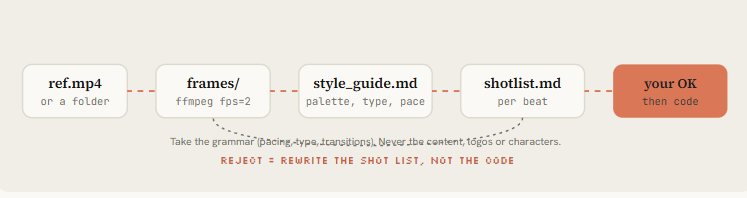
Reference: ./refs/launch.mp4 (and ./refs/frames/*.png)

1. Extract one frame every 0.5s with ffmpeg. Study them.
2. Write ./docs/style_guide.md: palette (hex), type (family, weight, tracking),
   shot lengths, transition types, camera moves, texture/grain, how text enters and exits.
3. Write ./docs/shotlist.md for a [DURATION]s video about [SUBJECT] in THAT style.
   Take the grammar of the reference, never its content, logos or characters.
4. Show me both files. Wait for my OK before any code.
Pleometric은 p5.js를 제안했지만 Opus는 종이 질감 렌더러를 직접 짜는 쪽을 골랐습니다. 레퍼런스를 줬다면 기법은 모델이 고르게 두세요.
재사용을 위해 특정 프레임워크가 꼭 필요한 게 아니라면, 라이브러리가 아니라 룩과 제약 조건을 지정하세요.
보여주는 것: 대부분의 "프롬프트 하나" 영상이 똑같아 보이는 이유와, 레퍼런스 + 프레임워크 + 컴포넌트로 고치는 법.
Rexan Wong @rexan_wong · 9월 26일
모두가 Opus 5.5가 만든 모션 그래픽 비디오를 공유하고 있고, 진짜 미쳤어 모두가 "한 번의 프롬프트"로 만들었다고 하지만, 내 한 번의 프롬프트 비디오는 그냥 그랬어 그래서 이 비디오들을 잔뜩 살펴보고 실제로 어떻게 만들어졌는지 봤고, 제대로 작동하는 워크플로를 찾았어 opus로 프로 레벨 더 보기
X에서 Rexan Wong(@rexan_wong) 님
x.com
"자기 TikTok 피드" 애니메이션. 순수 코드로, 다른 바이럴 작품의 프레임 하나에서 시작했습니다. 단일 프레임 레퍼런스의 실제 사례입니다.
Pleometric @pleometric · 9월 23일
저는 Opus 5.5에게 TikTok 피드가 어떻게 생겼는지 애니메이션을 만들어 달라고 요청했어요 👇
X에서 Pleometric(@pleometric) 님
x.com
06. 스펙 - 분위기가 아니라 상태 목록을 써라
이번 주 가장 많이 북마크된 프롬프트는 한 줄짜리가 아니었습니다.
@twoclipping의 UI 모핑(조회 90만 7천, 북마크 1만 9천)과 @verbove의 MakerMap 영상은 둘 다 XML 스펙을 썼습니다. 물어볼 입력값, 연출 방향, 비트별 상태 목록, 제작 규칙, 주의점. NFT_Chen의 편집기 영상은 같은 아이디어를 이야기로 만든 것입니다. 가짜 UI는 모든 요소의 상태가 정해진 세트장입니다.
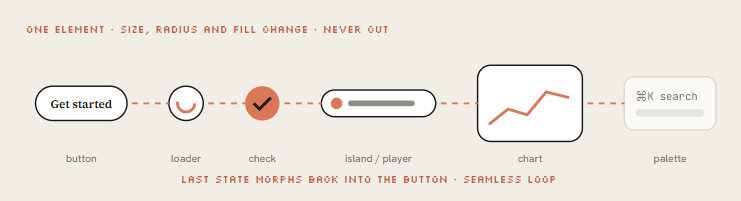
그 바탕에 있는 콘셉트는 "도형 하나, 컷 없음"입니다. 요소 하나가 상태마다 크기·모서리·색을 바꾸며 변형되고(버튼, 로더, 플레이어, 슬라이더, 차트, 커맨드 팔레트), 커서가 실제 클릭으로 각 변화를 이끌며, 마지막 프레임이 첫 프레임과 같아서 루프가 됩니다.
아래는 이 구조로 만든 제 템플릿입니다. 원본은 참고 자료에 링크해 두었습니다.
<inputs>
Ask me for: my product + URL, 8 to 12 UI states that tell its story, the real data shown in
each state, brand colors + fonts + one accent, a royalty-free track near 120 BPM, formats.
</inputs>

<direction>
Product-film UI motion. One container never cuts: every state is the same element changing
size, radius and fill while its content swaps behind a short blur. A cursor drives every change.
Warm neutral canvas, one accent. Springs with at most a tiny overshoot.
Banned: bouncy easing, glows, gradients on UI chrome, particle bursts, dead time.
</direction>

<structure>
120 BPM, 8 bars, something happens on every beat.
logo → CTA button → email field (typed) → loader → success check → dashboard card
→ chart draws itself → tooltip on hover → ⌘K palette → toast → logo.
</structure>

<build>
1. One HTML file, one canvas, window.seek(t). No CSS transitions, no timers, no carried state.
2. Closed-form springs. A value with many targets = sum of one spring per change.
3. Text inside a morphing container enters after the morph starts, leaves before the next one.
4. Tab indicators: leading and trailing edges on different springs so they stretch.
5. Beat grid from the track (numpy/librosa). Start on a downbeat. UI sounds on measured peaks.
6. Render in headless Chrome at 60 fps, 4 subframes per frame, blended for motion blur.
</build>

<gotchas>
Never use will-change on anything the camera scales (blurry text).
The last frame must equal the first, cursor position and velocity included.
</gotchas>

<start>
Ask for the inputs, then show me the state list on the beat grid before writing code.
</start>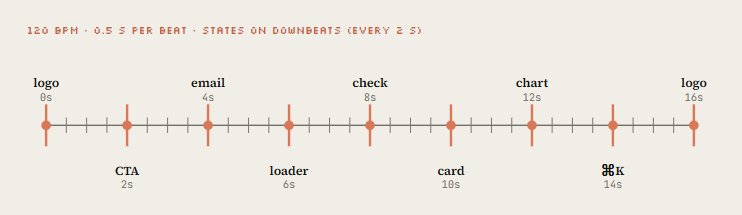
스레드에 XML 템플릿을 공개한 UI 모핑 루프(조회 90만 7천). 스펙 패턴의 원조입니다. 그림 2 바로 뒤에 두세요.
zero @twoclipping · 9월 25일
opus 5.5는 모션 디자인에서 정말 미쳤어 이 전체 비디오는 코드로 만들어졌어, 애프터 이펙트 0 이 모션 디자인들의 프롬프트 템플릿을 오픈 소스화할게 이걸 훔쳐서 재현해 ↓ <inputs> 나한테 물어봐: 모양이 변할 8~12개의 UI 상태 (예: 버튼, 로더, 플레이어, 슬라이더, 토글, 탭, 차트, 명령 더 보기
X에서 zero(@twoclipping) 님
x.com
MakerMap: 도형 하나가 제품 전체를 따라 변형되고, 실제 데이터, HTML 파일 하나. 같은 스펙을 실제 제품에 적용한 사례입니다.
Martijn Verbove @verbove · 9월 25일
Opus 5.5는 모션 디자인에서 완전히 미쳤어 이 전체 비디오는 코드야 0 After Effects 0 수동 애니메이션 내가 바이럴 모션 포스트 하나 보여주고 말했어: “MakerMap 설명해, 하지만 미친 듯이 만들어” 그리고 20초짜리 결과물이 돌아왔어: 하나의 형태가 전체 제품을 변형하며 지나가는 거: 더 보기
X에서 Martijn Verbove(@verbove) 님
x.com
Opus가 카툰 영상 편집기를 코딩하고 그 안에서 편집합니다. 타임라인, 파형, 내보내기 버튼까지 전부 그린 것입니다.
SuSu_酥酥👅 @NFT_Chen · 9월 23일
😱 무적이다! Opus 5.5가 스스로 카툰 편집 소프트웨어 한 세트를 써놓고, 그 안으로 들어가서 편집 끝냈다! 비디오 모델 안 타고, 순수 프로그램, code2video! Claude 작은 인물이 타임라인 위에 서 있어: 해돋이 → 뜨거운 커피 → 세 마리 고양이 → 스스로 춤추기. 손을 뻗어 Sparkle을 70%로 더 보기
X에서 SuSu_酥酥👅(@NFT_Chen) 님
x.com
영화 세트로서의 UI. 스펙 접근법의 이야기 버전입니다.
- 파트 3 · 엔진 만들기
07. 엔진 - seek(t) 렌더러 만들기
Opus가 기본으로 고르는 A 경로를 깔끔하게 정리한 것입니다. 파일은 두 개. 페이지는 요청받은 어느 순간이든 그려 내고, 렌더러는 시간을 따라가며 프레임을 ffmpeg로 넘깁니다.

<style>html,body{margin:0;background:#141413}canvas{display:block}</style>
<canvas id="c" width="1080" height="1920"></canvas>
<script>
const W = 1080, H = 1920, DUR = 15;
const g = document.getElementById('c').getContext('2d');
const clamp = (x, a = 0, b = 1) => Math.min(b, Math.max(a, x));

// Closed-form damped spring, 0 → 1. Pure function of time (step 08 explains it).
function spring(t, k = 170, d = 26) {
  if (t <= 0) return 0;
  const w0 = Math.sqrt(k), z = d / (2 * w0);
  if (z < 1) {
    const wd = w0 * Math.sqrt(1 - z * z);
    return 1 - Math.exp(-z * w0 * t) * (Math.cos(wd * t) + (z * w0 / wd) * Math.sin(wd * t));
  }
  return 1 - Math.exp(-w0 * t) * (1 + w0 * t);      // z >= 1 treated as critical
}

// Seeded noise, never Math.random: the render must be identical every run
function rng(seed) { return () => { seed |= 0; seed = seed + 0x6D2B79F5 | 0;
  let t = Math.imul(seed ^ seed >>> 15, 1 | seed);
  t = t + Math.imul(t ^ t >>> 7, 61 | t) ^ t; return ((t ^ t >>> 14) >>> 0) / 4294967296; }; }

const SCENES = [
  { from: 0, to: 3, draw(t) {                        // kinetic title
      const s = spring(t - 0.1, 220, 22);
      g.save(); g.translate(W / 2, H / 2); g.scale(0.6 + 0.4 * s, 0.6 + 0.4 * s);
      g.globalAlpha = clamp(t * 4);
      g.fillStyle = '#F0EEE6'; g.font = '700 190px "Source Serif 4", serif';
      g.textAlign = 'center'; g.fillText('MOTION', 0, 0);
      g.fillStyle = '#D97757'; g.fillRect(-320 * s, 50, 640 * s, 18);
      g.restore();
  }},
  { from: 3, to: 6, draw(t) {                        // grid of squares on a stagger
      const r = rng(7);
      for (let i = 0; i < 48; i++) {
        const x = (i % 6) * 170 + 115, y = Math.floor(i / 6) * 170 + 360;
        const s = spring(t - i * 0.03 - r() * 0.1, 260, 20);
        g.fillStyle = i % 7 ? '#F0EEE6' : '#D97757';
        g.fillRect(x - 60 * s, y - 60 * s, 120 * s, 120 * s);
      }
  }},
  // ... more scenes: Opus appends here, one object per shot
];

function draw(t) {
  g.fillStyle = '#141413'; g.fillRect(0, 0, W, H);
  for (const s of SCENES) if (t >= s.from && t < s.to) s.draw(t - s.from);
}
window.seek = (t) => { draw(t); return true; };

// Live preview in a normal browser, off during headless render
if (!navigator.webdriver) {
  const t0 = performance.now();
  (function loop() { draw(((performance.now() - t0) / 1000) % DUR); requestAnimationFrame(loop); })();
}
</script>
// node render.mjs --fps 60 --dur 15 --sub 4
import { chromium } from 'playwright';
import { spawn } from 'node:child_process';
import { mkdirSync } from 'node:fs';
const arg = (k, d) => { const i = process.argv.indexOf('--' + k); return i > 0 ? Number(process.argv[i + 1]) : d; };
const FPS = arg('fps', 60), DUR = arg('dur', 15), SUB = arg('sub', 4);
mkdirSync('out', { recursive: true });
const browser = await chromium.launch();
const page = await browser.newPage({ viewport: { width: 1080, height: 1920 }, deviceScaleFactor: 1 });
await page.goto('file://' + process.cwd() + '/index.html');
await page.evaluate(() => document.fonts.ready); // canvas text needs loaded fonts
// tmix averages SUB consecutive subframes; select keeps the last of each group
const vf = `tmix=frames=${SUB},select='eq(mod(n\\,${SUB})\\,${SUB - 1})',setpts=N/${FPS}/TB`;
const ff = spawn('ffmpeg', ['-y', '-f', 'image2pipe', '-framerate', String(FPS * SUB), '-i', '-',
'-vf', vf, '-r', String(FPS), '-c:v', 'libx264', '-crf', '16', '-pix_fmt', 'yuv420p', 'out/silent.mp4'],
{ stdio: ['pipe', 'inherit', 'inherit'] });
const total = Math.round(DUR * FPS * SUB);
for (let i = 0; i < total; i++) {
await page.evaluate((t) => window.seek(t), i / (FPS * SUB));
const png = await page.locator('#c').screenshot({ type: 'png' });
if (!ff.stdin.write(png)) await new Promise((r) => ff.stdin.once('drain', r));
if (i % (FPS * SUB) === 0) console.log(`rendered ${i / (FPS * SUB)}s / ${DUR}s`);
}
ff.stdin.end();
await new Promise((r) => ff.on('close', r));
await browser.close();프레임워크가 더 좋다면? 같은 프롬프트, B 경로
# Remotion (React): best for series, templates, data-driven videos
npx create-video@latest launch-film && cd launch-film
npx skills add remotion-dev/skills
claude
> /remotion-create a 20s 9:16 launch film for [PRODUCT], springs only, one accent color
npx remotion studio                 # live timeline preview
npx remotion render Main out/launch.mp4

# HyperFrames (HTML + GSAP): best when you think in web pages
npx hyperframes init my-video && cd my-video
npx hyperframes skills update
claude
> Using /hyperframes, turn ./notes.md into a 45-second pitch video with kinetic captions
npx hyperframes preview && npx hyperframes render
08. 스프링 - 모션을 비싸 보이게 만들기
싸 보이는 모션은 고정된 곡선으로 A에서 B로 이동합니다. 비싸 보이는 모션에는 질량이 있습니다. 가속하고, 살짝 넘어갔다가, 자리를 잡습니다.
모핑 영상들은 모두 닫힌 형태의 스프링을 지정합니다. 시간에 대한 순수 함수로 남기 때문에 seek(t)의 결정성이 유지됩니다.
대부분이 놓치는 요령이 있습니다. 값의 목표가 여러 번 바뀔 때(커서, 컨테이너 너비) 스프링을 다시 시작하지 않는 겁니다.
변화마다 스프링을 하나씩 더하고, 각각 자기 시점에서 시작하게 합니다. 모션은 끊기지 않고, 0~811번 프레임을 시뮬레이션하지 않고도 812번 프레임을 렌더링할 수 있습니다.
// keys: [[time, value], ...] sorted by time. Returns the value at t.
export function track(t, keys, k = 170, d = 26) {
  let v = keys[0][1];
  for (let i = 1; i < keys.length; i++)
    v += (keys[i][1] - keys[i - 1][1]) * spring(t - keys[i][0], k, d);
  return v;
}

// A tab indicator that stretches: leading edge is stiffer than trailing edge
export function indicator(t, stops) {             // stops: [[time, x], ...]
  const lead  = track(t, stops, 320, 30);
  const trail = track(t, stops, 140, 22);
  return { left: Math.min(lead, trail), right: Math.max(lead, trail) + 120 };
}

// Text inside a morphing box: in after the morph starts, out before the next one
export function swapAlpha(t, tIn, tOut) {
  return Math.min(clamp((t - tIn - 0.08) / 0.12), clamp((tOut - 0.1 - t) / 0.1));
}

// Seamless loop: pin the last frame to the first
export const loopT = (t, dur) => ((t % dur) + dur) % dur;- 경쾌한 UI: 버튼, 토글, 앞쪽 가장자리
- 기본: 카드, 컨테이너, 카메라
- 묵직함: 큰 타이포, 3D 오브젝트, 로고 락업
- 장난스러움: 마스코트, 스티커(눈에 띄는 오버슈트)"
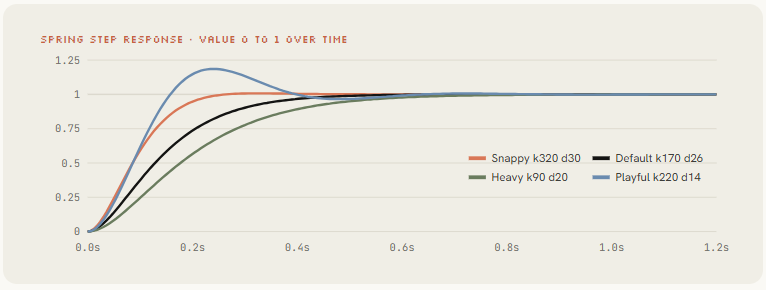
Replace every easing curve with closed-form springs from lib/motion.js. Tiny overshoot on UI, none on type. Any value with more than one target uses track()." (모든 이징 곡선을 lib/motion.js의 닫힌 형태 스프링으로 바꿔라. UI에는 아주 작은 오버슈트, 타이포에는 없음. 목표가 둘 이상인 값은 track()을 써라.) Opus는 파일 전체를 한 번에 리팩터링합니다.
09. 사운드 - 비트에 맞춰 음악 깔기
Rob Hallam은 오디오를 후반에 넣은 줄 알았습니다. 아니었습니다.
@oozn의 스티브 잡스 영상은 Node에서 사운드트랙을 합성했고, 모든 컷을 120 BPM에 맞췄습니다.
Vox의 "small print" 작품은 Python으로 음악을 합성한 뒤, 그 음악에 맞춰 렌더링을 1초 단위로 다듬었습니다. "AI 영상"이 영화처럼 느껴지기 시작하는 지점이 사운드입니다.
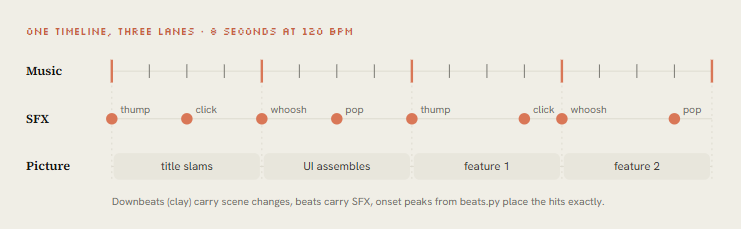
길은 두 가지입니다. 음원을 직접 준다면 측정하세요. 주지 않는다면 화면과 같은 타임라인 위에서 합성하세요.
# python beats.py song.wav > beats.json   (the animation reads this file)
import sys, json, numpy as np, librosa

y, sr = librosa.load(sys.argv[1], sr=None, mono=True)
tempo, frames = librosa.beat.beat_track(y=y, sr=sr, units="frames")
beats = librosa.frames_to_time(frames, sr=sr).round(3).tolist()

onset = librosa.onset.onset_strength(y=y, sr=sr)
peaks = librosa.util.peak_pick(onset, pre_max=3, post_max=3, pre_avg=3,
                               post_avg=5, delta=0.5, wait=10)
json.dump({
    "bpm": float(np.atleast_1d(tempo)[0]),
    "beats": beats,                                   # state changes go here
    "downbeats": beats[::4],                          # big moments go here
    "hits": librosa.frames_to_time(peaks, sr=sr).round(3).tolist(),  # SFX go here
}, sys.stdout, indent=1)
// node sfx.mjs cues.json out/sfx.wav cues: [{"t":0.5,"type":"click"}, ...]
import { readFileSync, writeFileSync } from 'node:fs';
const SR = 48000, cues = JSON.parse(readFileSync(process.argv[2], 'utf8'));
const buf = new Float32Array(Math.ceil((Math.max(...cues.map(c => c.t)) + 2) * SR));
let s = 42; const noise = () => (s = (s * 1664525 + 1013904223) >>> 0) / 2147483648 - 1;
const VOICES = {
click: [0.05, t => Math.sin(2 * Math.PI * 1800 * t) * Math.exp(-t * 90) * 0.5],
pop: [0.15, t => Math.sin(2 * Math.PI * (600 + 900 * t) * t) * Math.exp(-t * 30) * 0.4],
thump: [0.50, t => Math.sin(2 * Math.PI * (90 - 60 * t) * t) * Math.exp(-t * 9) * 0.9],
whoosh: [0.35, t => noise() * Math.sin(Math.PI * Math.min(1, t / 0.35)) * 0.25],
};
for (const c of cues) {
const [len, fn] = VOICES[c.type], start = Math.floor(c.t * SR);
for (let i = 0; i < len * SR && start + i < buf.length; i++) buf[start + i] += fn(i / SR);
}
const n = buf.length, b = Buffer.alloc(44 + n * 2); // 16-bit mono WAV
b.write('RIFF', 0); b.writeUInt32LE(36 + n * 2, 4); b.write('WAVEfmt ', 8);
b.writeUInt32LE(16, 16); b.writeUInt16LE(1, 20); b.writeUInt16LE(1, 22);
b.writeUInt32LE(SR, 24); b.writeUInt32LE(SR * 2, 28); b.writeUInt16LE(2, 32); b.writeUInt16LE(16, 34);
b.write('data', 36); b.writeUInt32LE(n * 2, 40);
for (let i = 0; i < n; i++) b.writeInt16LE(Math.round(Math.max(-1, Math.min(1, buf[i])) * 32767), 44 + i * 2);
writeFileSync(process.argv[3], b);스티브 잡스 전기 영상: Remotion + SVG, 전환 23개, Node에서 합성한 사운드트랙, 120 BPM에 맞춘 컷.
코드로 합성한 음악이 2분짜리 영상을 이끌 수 있다는 증거입니다.
onur ozcan @oozn · 9월 25일
오퍼스 5.5가 스티브 잡스의 삶 애니메이션을 원 샷으로 만들었어요 그 애니메이션 능력을 보고 호기심이 생겨서, 스티브 잡스의 이야기를 애니메이션으로 만들어 달라고 요청했어요. 2분, 하나의 프롬프트, 코드로 완전히 구축: → remotion + react + svg, ~8.7k lines → 절차적 워크 사이클이 더 보기
X에서 onur ozcan(@oozn) 님
x.com
"Small print": 이야기, 프레임, 음악 모두 Opus가 만들고 HyperFrames로 렌더링했습니다. Python으로 합성한 음악, 그다음 1초 단위 다듬기.
Vox @Voxyz_ai · 9월 23일
와, 젠장, 오푸스 5.5가 애니메이션에서 좀 미쳤네. 나는 코드 한 줄도 안 썼어. 스토리를 썼고, 모든 프레임을 그렸으며, 음악까지 만들었어. 이미지 에셋은 전혀 없고, 전부 JS야. 스토리 제목은 "작은 글씨": 클로드가 매일 요청 더미를 받지. 그 안의 인간적인 부분을 원으로 표시해, 예를 들어 더 보기
X에서 Vox(@Voxyz_ai) 님
x.com
- 파트 4 · 클립 하나에서 스튜디오로
10. 밤새 돌리기 - 감독 브리프 쓰기
Donald는 5분 동안 말로 지시하고 잠들었는데, 일어나 보니 조회 210만 회짜리 142초 뮤직비디오가 있었습니다.
그가 공개한 프롬프트는 약 9,500자입니다. @pradeepXkapoor의 로봇 영화 "Pip"은 1만 9천 자짜리 브리프를 썼습니다. 둘 중 무엇을 읽어도 같은 뼈대가 보입니다. 영상을 묘사하는 게 아니라 제작진을 고용하는 겁니다.
- 한 줄 요약. 로그라인과 핵심 농담. 모든 결정을 이 기준으로 점검할 수 있게.
- 레퍼런스. 원본 영상, 노래, 이미지 라이브러리, 이전 작업의 GitHub 저장소. 무엇을 유지하고 무엇을 밀어붙일지.
- 도구와 키. 불러올 스킬, 쓸 수 있는 API(이미지, 영상, 음성), 예산, 문서 위치. "아껴서 쓸 것."
- 캐릭터 바이블. 비율, 시트에서 뽑은 팔레트, 표정, 어떤 스타일 변화에도 유지되는 정체성 고정.
- 비트 시트. 타임스탬프가 붙은 막 구성, 3~5초마다 시각적 보상, 첫 2초 안의 훅.
- 화면 텍스트. 가사나 자막을 언제 크게 띄우고 언제 자막처럼 둘지. 구도에 그 자리를 남겨 둘 것.
- 작업 관문. 기획 → 리깅 → 스틸 → 애니매틱 → 전체 패스 → 다듬기 → 오디오 → 렌더. 관문을 건너뛰지 말 것.
- 비평 루프. 스틸을 렌더링하고, 점수를 매기고, 가장 나쁜 문제 3개를 적고, 고치고, 모든 점수가 8점 이상이 될 때까지 반복.
- 결과물. 최종 MP4, 루프 확인, 포스터 프레임, 컨택트 시트, README가 있는 깔끔한 소스.
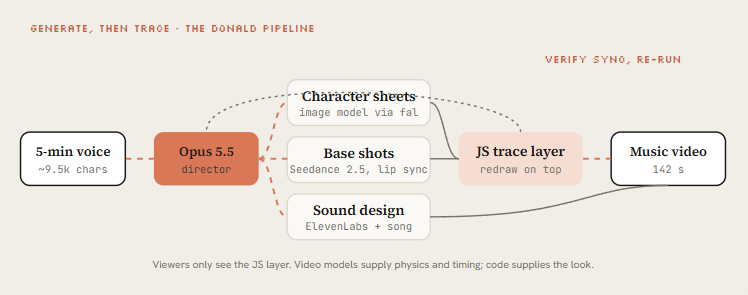
Donald 브리프의 핵심 수는 "생성 후 트레이싱"입니다. Seedance 2.5가 캐릭터와 물리가 들어간 기본 샷을 렌더링하고, 그 위에 Opus가 JavaScript로 영상 전체를 다시 그려서 시청자는 코드로 그린 레이어만 보게 됩니다.
영상 모델은 손으로 코딩하기 어려운 움직임을 주고, JS 레이어는 일관되고 내 것으로 삼을 수 있는 룩을 줍니다. Pleometric은 같은 브리프를 자기 갤러리로 다시 돌려 완전히 다른 영상을 얻었습니다.
컴퓨터에 5분 말했더니 Claude가 12시간 일했다." Claude Pop 뮤직비디오, 조회 210만. L4의 대표 사례입니다.
donald @donaldjewkes · 9월 24일
이걸 Opus 5.5를 사용해 한 번의 프롬프트로 만들었어요 컴퓨터와 5분 동안 이야기했더니, claude가 12시간 동안 일했고, 깨어났을 때 이게 있었어요 전체 프롬프트:
X에서 donald(@donaldjewkes) 님
x.com
말로 지시한 약 9,500자짜리 전체 브리프. 아래 감독 브리프 템플릿과 비교해 보세요.
donald @donaldjewkes · 9월 24일
“Claude Pop”이라는 영상의 MP4 파일과 원본 링크를 넣었어. 팝송인데… (전체 브리프는 원문 답글 참고)
X에서 donald(@donaldjewkes) 님
x.com
Donald의 브리프를 PC-98 갤러리로 다시 돌린 것. 원패스를 유지하려고 버그를 남겨 둔 혼합 흐름입니다.
Pleometric @pleometric · 9월 24일
이 비디오는 저에게 오푸스 5.5를 정말로 밀어붙여서 그 한계를 테스트하게 영감을 주었습니다. 도널드가 여기서 설명한 일반적인 워크플로우를 따랐고, 결과는 훌륭합니다.
X에서 Pleometric(@pleometric) 님
x.com
You are the director, animator, sound designer and render engineer for a [DURATION] film
made in code. Treat this as a multi-session production. Don't rush to a final render.

## The film in one line
[LOGLINE. What the viewer should feel at the end.]

## References and inputs
- ./refs/ : [video / frames / image library]. Take the grammar, never the content.
- ./audio/track.wav : use it unchanged. Measure beats with beats.py first.
- Skills available: [/remotion-best-practices | /hyperframes | /claude-animation].
- APIs in .env: [ELEVENLABS_API_KEY, FAL_KEY]. Budget: [$X]. Be economical.

## Look
[3-5 lines: palette, type, texture, camera language. Banned looks.]

## Beat sheet
0:00-0:02  hook: [the single most striking image]
0:02-0:10  [act 1]
...        a new visual payoff every 3-5 seconds
[END]      the last frame sets up the first frame (loop)

## Workflow, with gates
1. Write docs/style_guide.md and docs/shotlist.md (every shot: frames, camera, text, SFX).
   Show me the shot list. Then continue without waiting if I don't answer in 10 minutes.
2. Build stills for every shot. Contact sheet. Critique.
3. Animatic at 960x540 with placeholder audio. Fix pacing before polish.
4. Full animation, polish pass, sound pass, final render.
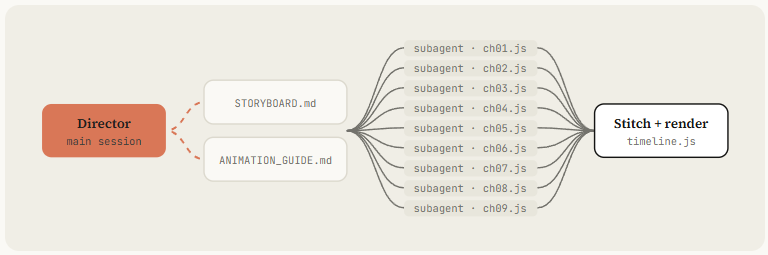
5. Split work across subagents per chapter. Write docs/ANIMATION_GUIDE.md first
   so every subagent codes in the same style.

## Critique loop (every shot, at least 3 rounds)
Render 3-5 stills, score 1-10 on: hook, readability at 360px wide, motion, composition,
depth, sound sync, polish. Log scores + 3 biggest problems in docs/review_log.md. Fix. Repeat
until all are 8+.

## Deliverables
out/final.mp4 · out/loop_check.mp4 · out/poster.png · out/contact.png · README.md
John Heibel의 PDoom 저장소(스타 1,100개)는 서브에이전트 패턴을 실제로 보여줍니다. Opus는 병렬로 돌린 서브에이전트에게 지시하려고 ANIMATION_GUIDE.md를, 첫 생성 뒤에는 STORYBOARD.md를 썼고, src/ch/에 챕터 9개가 있습니다. 두 파일을 이름으로 요청하세요.
11. 비평 - Opus가 자기 프레임을 보게 하라
Opus 5.5는 이미지를 읽습니다. 자기가 렌더링한 결과를 볼 수 있다는 뜻이고, 이 습관 하나가 바이럴이 된 클립과 "좀 그저 그렇네"라며 올라온 클립을 가릅니다.
@mablesjoseph의 수채화 단편은 이를 솔직하게 밝혔습니다. 원샷이 아니라 모델 호출 163번, 거의 7시간. Drew의 출시일 작품에도 정리 라운드가 눈에 보였습니다. 반복은 실패가 아니라 방법입니다.
# Contact sheet: 2 frames per second, 6 across
ffmpeg -i out/final.mp4 -vf "fps=2,scale=270:-1,tile=6x5" -frames:v 1 out/contact.png

# Strip: 12 consecutive frames around a fast action at 4.2s (catch pops and overlaps)
ffmpeg -ss 4.1 -i out/final.mp4 -vf "scale=320:-1,tile=12x1" -frames:v 1 out/strip.png

# Phone test: how it reads at 360 px wide
ffmpeg -i out/final.mp4 -vf "fps=1,scale=360:-1,tile=5x3" -frames:v 1 out/phone.png

# Loop check: play it twice back to back and watch the seam
ffmpeg -stream_loop 1 -i out/final.mp4 -c copy out/loop_check.mp4

# Determinism check: frame 300 rendered twice must hash the same
node render.mjs --dur 5 --fps 60 --sub 1 && md5 out/silent.mp4   # run twice, compare
Open out/contact.png, out/strip.png and out/phone.png and look at them properly.
Be a harsh motion director, not a proud author.
Score 1-10: hook in first 2s · readability at phone size · motion quality (springs,
no dead frames) · variety (new thing every 2-4s) · composition · brand accuracy · sound sync.
List the 3 biggest problems with timestamps. Hunt specifically for: text overlapping during
swaps, anything sliding instead of easing, corner labels and frame borders, centered-on-gradient
shots, blurry scaled text, a dead beat with nothing happening, a stutter at the loop seam.
Fix them, re-render only the affected seconds, show me the new contact sheet and new scores.출시일 작품, 조회 170만, 정리 라운드가 눈에 보입니다. 반복이 방법입니다. 다음 임베드와 함께 보세요.
DreW @devteamdrew · 9월 23일
@claudeai Opus 5.5로 제작됨
X에서 DreW(@devteamdrew) 님
x.com
공개적으로 원샷이 아니라고 밝힌 수채화 단편: 모델 호출 163번, 약 6시간 45분. "프롬프트 하나" 주장에 대한 정직한 반례입니다.
Mable Joseph @mablesjoseph · 9월 25일
Opus 5.5로 45초짜리 손으로 그린 애니메이션 단편 영화를 만들었습니다. 애니메이션 소프트웨어는 사용하지 않았습니다. 모든 붓질, 수채화 물감 칠하기, 효과음은 코드로 생성되었습니다. Opus 5.5가 한 번에 완벽하게 작동하나요? 사실 그렇지는 않습니다. 좋지만 여전히 좋은 지원 프로젝트가 더 보기 0:45
X에서 Mable Joseph(@mablesjoseph) 님
x.com
12. 출시 - 포맷, 스킬, 그리고 서비스
마지막 세 가지가 좋은 클립을 반복 가능한 사업으로 바꿉니다. 타임라인 하나에서 모든 포맷을 내보내세요. 파이프라인을 스킬로 묶어서 다음 영상은 문장 하나로 끝나게 하세요. 그리고 원한다면, 같은 주에 achxvi가 한 것처럼 팔아 보세요.
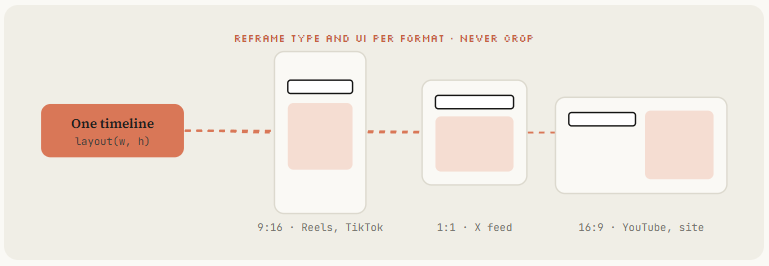
타임라인 하나에서 모든 포맷
장면을 고정 픽셀이 아니라 레이아웃 함수 기준으로 쓰고, Opus에게 9:16, 1:1, 16:9를 병렬로 렌더링하라고 하세요.
MakerMap 스펙이 정확히 이걸 요청했습니다. 포맷마다 타이포와 UI를 다시 배치하세요. 16:9 렌더링을 세로로 잘라 쓰지 마세요.
스킬로 묶기
---
name: motion-reel
description: Make a product or showreel motion video rendered from code. Use when the
  user asks for a launch video, showreel, product reel, animated explainer or motion ad.
---

# Motion reel

## Inputs to collect first
Product + URL, duration, formats (9:16 / 1:1 / 16:9), brand colors + fonts,
a reference (frame, video or image folder), music (file or "synthesize").

## Pipeline
1. Gather assets from the URL with Playwright into ./assets. List them.
2. If a reference exists, write docs/style_guide.md from it.
3. Measure or synthesize music. beats.py → beats.json.
4. Write docs/shotlist.md on the beat grid. Show it and wait for OK.
5. Build index.html with window.seek(t) using lib/motion.js springs. Follow CLAUDE.md.
6. Contact sheet → critique-pass (see prompts/critique-pass.txt) → fix. 3 rounds minimum.
7. node render.mjs → sfx.mjs → mix to -14 LUFS → out/final.mp4, all formats.
8. Deliver final.mp4, contact.png, poster.png. Say what you'd improve next.

## Hard rules
- Real product UI only. Never invent screens.
- No Math.random, no timers, no CSS transitions in render mode.
- Banned: corner labels, centered title on gradient, everything fading in.
이제 코스 전체가 "/motion-reel for [URL], 20s, vertical, reference ./refs/frame.png" 한 줄로 줄어듭니다. 스킬 폴더를 팀과 공유하거나 buildwithhanif처럼 플러그인으로 공개하세요.
수익으로 바꾸기
achxvi의 제안은 좋은 템플릿입니다. 음악, 어떤 스타일이든 마스코트, 제품 기능, 마지막의 오퍼, 어떤 언어든, 수정 최대 3회.
Tony Dinh의 숫자가 가격의 기준이 됩니다. 1년 전 사람들은 이런 영상에 약 1,000달러를 냈습니다. 스킬과 비평 루프가 있으면 오후 한나절에 납품할 수 있습니다.
Chain @achxvi · 9월 27일
Opus 5.5가 45분 만에 이걸 해냈어요 정말 미쳤네요 🤯😳🫣
X에서 Chain(@achxvi) 님
x.com
45분 만에 만든 38초 세로 제품 영상, 그리고 이를 유료 서비스로 제안한 답글. "수익으로 바꾸기"의 증거입니다. 이 문단 바로 아래에 두세요.
클론할 저장소
- 뮤직비디오: https://github.com/JohnHeibel/PDoomVideo
- 스타터: https://github.com/JohnHeibel/ClaudeAnimationBase
- Node 캔버스: https://github.com/buildwithhanif/claude-animation-skill
- 프레임워크(HTML): https://github.com/heygen-com/hyperframes
- 프레임워크(React): https://www.remotion.dev/docs/ai/skills
- 장편: https://github.com/WinterArc21/Battle-of-Austerlitz-Film
- 프롬프트 라이브러리: https://github.com/guanmo-ai/awesome-ai-motion
- 데이터셋: https://github.com/athemeroy/awesome-opus-5-5-videos
결론:
한 줄 프롬프트는 클립 하나를 줍니다. 하네스는 스튜디오를 줍니다.
스택을 설치하고, 레퍼런스를 훔치고, 상태 목록을 쓰고, seek(t) 엔진을 내 것으로 만들고, 모든 점수가 8점이 될 때까지 Opus가 자기 프레임을 보게 하세요.
그다음 그걸 스킬로 묶고, 다시는 긴 프롬프트를 쓰지 마세요.
AI, 바이브 코딩, 에이전트 시스템에 관한 최신 글을 받으려면 제 Substack을 구독하세요.